Overview
分类
- 按读取数据的方式
- 字节流
- 字符流
- 按流向
- 输入流:输入到内存
- 输出流:由内存输出到其他地方
- 按流的角色
- 节点流:针对某种特定数据的流,如文件流、数组流、管道流
- 包装流/处理流:在节点流之上提供某种处理方法的流
四个基类
| 方向 | 字节流 | 字符流 |
|---|---|---|
| 输入流 | InputStream | Reader |
| 输出流 | OutputStream | Writer |
下面记录常用的几个子类。
文件字节流
FileInputStream & FileOutputStream 文件复制 demo
@Test
public void fileCopy1() throws IOException {
	File src = new File("/home/henry/Desktop/source1.txt");
	File dest = new File("/home/henry/Desktop/dest1.txt");
	FileInputStream in = new FileInputStream(src);
	FileOutputStream out = new FileOutputStream(dest);

	byte[] buf = new byte[1024];
	int len = 0;
	while ((len = in.read(buf)) != -1) {
		out.write(buf, 0, len);
		out.flush();
	}
	in.close();
	out.close();
}
文件字符流
FileReader & FileWriter 文件复制 demo
@Test
public void fileCopy2() throws IOException {
	File src = new File("/home/henry/Desktop/source1.txt");
	File dest = new File("/home/henry/Desktop/dest1.txt");
	FileReader in = new FileReader(src);
	FileWriter out = new FileWriter(dest, true); // append 方式

	char[] buf = new char[1024];
	int len = 0;
	while ((len = in.read(buf)) != -1) {
		out.write(buf, 0, len);
		out.flush();
	}
	in.close();
	out.close();
}
缓冲处理流
- BufferedReader & BufferedWriter
@Test
public void fileCopy3() throws IOException {
	File src = new File("/home/henry/Desktop/source1.txt");
	File dest = new File("/home/henry/Desktop/dest1.txt");
	BufferedReader in = new BufferedReader(new FileReader(src));
	BufferedWriter out = new BufferedWriter(new FileWriter(dest));

	// 逐行读取
	String readLine;
	while ((readLine = in.readLine()) != null) {
		out.write(readLine);
		out.newLine();  // 插入一个换行符
		out.flush();
	}

	in.close();
	out.close();
}- BufferedInputStream & BufferedOutputStream
@Test
public void fileCopy4() throws IOException {
	File src = new File("/home/henry/Desktop/source2.pdf");
	File dest = new File("/home/henry/Desktop/dest2.pdf");
	BufferedInputStream in = new BufferedInputStream(new FileInputStream(src));
	BufferedOutputStream out = new BufferedOutputStream(new FileOutputStream(dest));

	// 逐行读取
	int len = -1;
	byte[] buf = new byte[1024];
	while ((len = in.read(buf)) != -1) {
		out.write(buf, 0, len);
		out.flush();
	}

	in.close();
	out.close();
}
对象处理流(序列化)
ObjectInputStream & ObjectOutputStream
@Test
public void testSerialize() throws IOException {
	File file = new File("/home/henry/Desktop/serialize");
	ObjectOutputStream out = new ObjectOutputStream(new FileOutputStream(file));
	ObjectInputStream in = new ObjectInputStream(new FileInputStream(file));

	out.writeInt(10086);
	out.writeBoolean(true);
	out.writeChar('啊');
	out.writeUTF("会不会乱码呢?abc");

	out.close();

	System.out.println(in.readInt());
	System.out.println(in.readBoolean());
	System.out.println(in.readChar());
	System.out.println(in.readUTF());

	in.close();
}
注意:
- 需要实现 Serializable 接口 or Externalizable 接口
- 属性中的其他引用类型也必须实现该接口
- 使用 static、transient 修饰的属性不会被序列化
- 反序列化时必须按照序列化时的顺序,并且必须可以加载到这个类
- 添加 SerialVersionUID 以提高兼容性
转换处理流(乱码)
InputStreamReader & OutputStreamWriter
@Test
public void fileCopy5() throws IOException {
	File src = new File("/home/henry/Desktop/source1.txt");
	File dest = new File("/home/henry/Desktop/dest1.txt");
	BufferedReader in = new BufferedReader(new InputStreamReader(new FileInputStream(src), StandardCharsets.UTF_8));
	BufferedWriter out = new BufferedWriter(new OutputStreamWriter(new FileOutputStream(dest), StandardCharsets.UTF_8));

	// 逐行读取
	String readLine;
	while ((readLine = in.readLine()) != null) {
		out.write(readLine);
		out.newLine();  // 插入一个换行符
		out.flush();
	}

	in.close();
	out.close();
}
配置文件读取
Properties是 HashTable 的一个子类
@Test
public void properties() throws IOException {
	// File file = new File("../resources/pro.properties");
	File file = new File("src/test/resources/pro.properties");
	Properties properties = new Properties();
	// 读取配置文件
	properties.load(new FileReader(file));
	// 展示一下
	properties.list(System.out);
	// 根据 key 获取对应的 value
	System.out.println(properties.getProperty("name"));
	System.out.println(properties.getProperty("name1"));
	// 修改 k-v
	properties.setProperty("pwd", "123456中文");
	// 存储
	properties.store(new FileWriter(file), "test comments");

}

/*
-- listing properties --
name=henry
pwd=123456
henry
null
*/
输出文件
#test comments
#Sun Dec 26 17:57:42 CST 2021
name=henry
pwd=123456中文
问题
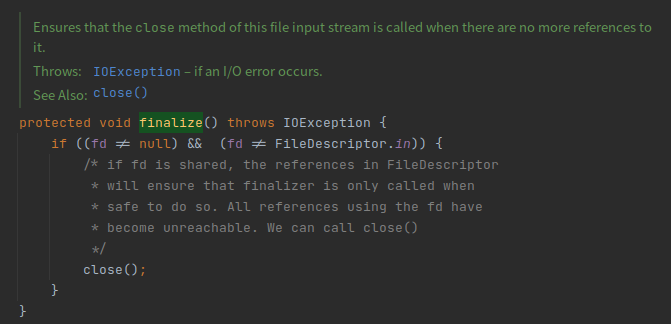
不关闭流会怎样?
若不关闭流,则文件描述符无法及时释放,影响后续操作,其实在流的 finalize 方法中有保底操作,但是 finalize 的执行时机是不可控的,因此还是建议使用完之后一定要关闭流。